
Android smartphones have become smarter than ever in 2026. However, most users only use basic features like calling, messaging, social media, and gaming. What many people don’t realize is that Android includes dozens of powerful hidden tools designed to improve performance, battery life, privacy, and productivity.
If you’ve recently bought a new Android phone or want to get more out of your current device, these android hidden features 2026 can completely transform your smartphone experience. Many of these features are built directly into Android and don’t require any third-party apps.
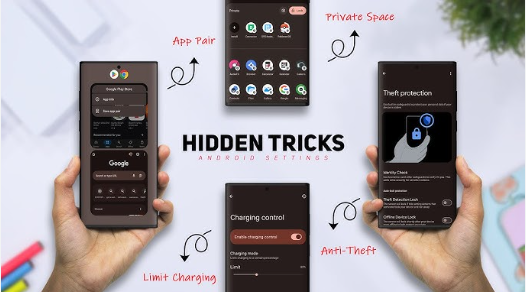
In this guide, you’ll discover secret Android settings that can help you speed up your phone, protect your personal data, increase battery backup, and unlock capabilities that most users never notice.
Table of Contents
1. Private Space – Hide Sensitive Apps and Files
Privacy is becoming increasingly important in 2026. Android’s new Private Space feature allows you to create a secure section inside your phone where sensitive apps and files can remain hidden from other users.
Whether you store banking apps, personal photos, confidential documents, or work-related files, Private Space adds an extra layer of protection.
Benefits of Private Space
- Hide important applications
- Secure private photos and videos
- Separate personal and work content
- Additional authentication security
Why You Should Use It
Many people hand their phones to friends or family members. With Private Space enabled, your personal information remains protected even if someone else uses your device.
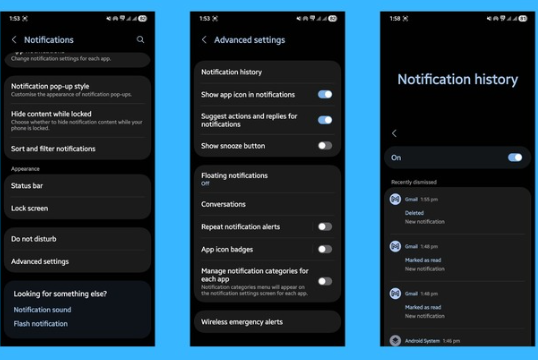
2. Notification History – Never Lose Important Alerts Again
Have you ever accidentally cleared a notification and then struggled to find it again?
Notification History solves this problem by keeping a record of recent alerts.
This feature is especially useful for WhatsApp messages, emails, banking notifications, OTPs, and social media alerts.
How It Helps
- Recover deleted notifications
- Read missed messages
- Track important updates
- Access previously dismissed alerts
Many Android users don’t even know this feature exists, making it one of the most useful android hidden features 2026.
3. App Archiving – Free Storage Without Losing Data
Storage problems are common on smartphones. Instead of uninstalling apps completely, Android now offers App Archiving.
When an app is archived, most of its storage is removed while keeping your personal data intact.
Advantages
- Saves storage space
- Keeps app settings
- Easy restoration
- Reduces clutter
Example
Suppose you use a travel booking app only a few times per year. Instead of uninstalling it and losing your data, archive it until needed again.
This simple feature can help maintain better phone performance while preserving convenience.
4. Live Caption – Smart Accessibility for Everyone
Live Caption automatically generates captions for videos, podcasts, voice notes, and other audio content.
The best part is that it works even when content doesn’t provide subtitles.
Ideal For
- Watching videos silently
- Learning new languages
- Accessibility support
- Understanding unclear audio
Why It’s Useful
Whether you’re in a library, office, classroom, or noisy environment, Live Caption helps you consume content without needing sound.
This hidden Android feature continues to improve with AI advancements in 2026.
5. Adaptive Battery – Get Longer Battery Life
Battery life remains one of the biggest concerns for smartphone users.
Adaptive Battery uses artificial intelligence to learn how you use your device and automatically restricts apps that consume excessive power in the background.
Benefits
- Improved battery backup
- Reduced background activity
- Better power management
- Smarter app control
Real-World Impact
Many users report noticeable battery improvements after enabling Adaptive Battery, especially if they have dozens of apps installed.
Among all android hidden features 2026, this is one of the easiest ways to extend battery life without changing your usage habits.
6. One-Handed Mode – Easier Navigation on Large Phones
Modern smartphones continue to get larger every year. While big screens are great for videos and gaming, they can be difficult to use with one hand.
One-Handed Mode temporarily shrinks the display area so your thumb can easily reach all controls.
Advantages
- Easier texting
- Better one-handed use
- Improved comfort
- Faster navigation
Best For
- Large-screen devices
- Users who travel frequently
- Quick messaging sessions
If you’ve ever struggled to reach the top of your screen, One-Handed Mode can significantly improve daily usability.
7. Split Screen Multitasking – Use Two Apps at Once
Multitasking has become essential for productivity.
Android’s Split Screen feature allows two applications to run simultaneously.
Popular Combinations
- YouTube + Notes
- Chrome + WhatsApp
- Google Docs + Browser
- Maps + Music
Productivity Benefits
Students, professionals, and content creators can save time by viewing information from one app while working in another.
This feature effectively turns your smartphone into a mini productivity machine.
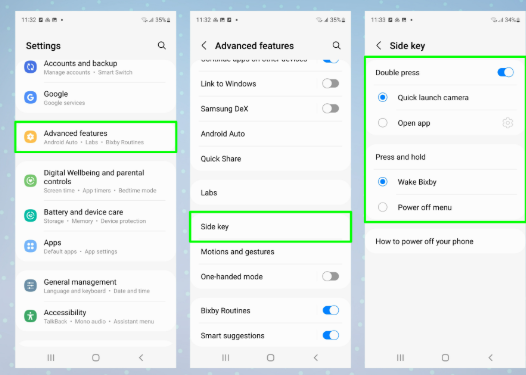
8. Quick Tap Gestures – Hidden Shortcuts You Should Enable
Quick Tap allows you to perform actions by tapping the back of your phone.
Depending on your device, you can assign different functions.
Possible Actions
- Take screenshots
- Open camera
- Launch flashlight
- Open favorite apps
- Activate voice assistant
Why It’s Useful
Instead of searching through menus, a simple double tap can instantly perform common tasks.
This is one of the smartest and most underrated Android features available today.
9. Screen Attention – Keep Your Display Awake
Screen Attention uses your phone’s camera to detect whether you’re actively looking at the display.
If you’re reading an article or viewing important information, the screen stays on automatically.
Benefits
- Prevents unwanted screen lock
- Better reading experience
- More convenient browsing
- Useful during presentations
For people who frequently read long articles or documents on their phones, this feature can be surprisingly helpful.
10. Developer Options – Unlock Advanced Android Controls
Most Android phones include a hidden menu called Developer Options. Although it was originally designed for developers, regular users can also benefit from several useful settings.
How to Enable Developer Options
- Open Settings.
- Go to About Phone.
- Tap Build Number seven times.
- Enter your PIN if required.
Once enabled, you’ll see Developer Options in your settings menu.
Best Developer Settings to Try
Reduce Animation Scale
One of the most popular tweaks is reducing animation speed.
Set:
- Window Animation Scale = 0.5x
- Transition Animation Scale = 0.5x
- Animator Duration Scale = 0.5x
This makes your phone feel significantly faster.
Show Refresh Rate
Many modern phones support high refresh rates. This option lets you monitor real-time refresh rates while using your device.
Limit Background Processes
Advanced users can reduce background processes to improve performance on older devices.
Why It Matters
If your phone feels slow, Developer Options can provide noticeable improvements without installing any apps.
11. Guest Mode – Protect Your Personal Data
Sometimes friends or family members need to borrow your phone. Instead of handing over full access, Guest Mode creates a temporary user profile.
Benefits
- Protects personal photos
- Hides messages
- Prevents unauthorized app access
- Keeps personal accounts secure
Best Use Cases
- Lending your phone to friends
- Letting children use your device
- Sharing phones temporarily
Privacy-focused users should definitely enable this feature.
12. Digital Wellbeing – Control Screen Time
Many people spend hours scrolling social media without realizing it.
Digital Wellbeing helps track and manage smartphone usage.
Features Included
App Timers
Set daily limits for apps like Instagram, YouTube, Facebook, and TikTok.
Bedtime Mode
Reduces distractions before sleep by muting notifications and adjusting display settings.
Focus Mode
Temporarily blocks distracting apps while working or studying.
Benefits
Better productivity
Reduced screen addiction
Improved concentration
Healthier smartphone habits
This is one of the most useful android hidden features 2026 for students and professionals.
13. Nearby Share – Fast Wireless File Transfer
Nearby Share allows Android devices to transfer files quickly without cables.
Many users still rely on messaging apps or cloud storage, but Nearby Share is often much faster.
What You Can Share
- Photos
- Videos
- Documents
- Applications
- Links
Advantages
- No internet required
- Fast transfer speeds
- Secure connections
- Easy setup
Why You Should Use It
Whether you’re sharing vacation photos or work documents, Nearby Share saves time and mobile data.
14. Smart Lock – Convenient Yet Secure
Constantly unlocking your phone can become frustrating.
Smart Lock automatically keeps your device unlocked under trusted conditions.
Smart Lock Features
Trusted Devices
Keep your phone unlocked when connected to trusted Bluetooth devices such as smartwatches or earbuds.
Trusted Locations
Automatically unlock at locations like home or office.
On-Body Detection
Keeps your phone unlocked while you’re carrying it.
Benefits
- Faster access
- Improved convenience
- Reduced frustration
- Maintains security
Smart Lock offers a great balance between security and usability.
15. Focus Mode – Eliminate Distractions Instantly
Focus Mode is one of the most practical Android tools available today.
It temporarily pauses selected applications so notifications cannot interrupt your work.
Perfect For
- Students
- Office workers
- Content creators
- Remote employees
What Happens When Enabled?
Selected apps become unavailable until Focus Mode is turned off.
This prevents:
- Social media distractions
- Gaming interruptions
- Unnecessary notifications
Productivity Benefits
Even 30 minutes of uninterrupted focus can dramatically improve efficiency.
Among all android hidden features 2026, Focus Mode is perhaps the most effective for productivity.
Android Hidden Features Comparison
| Feature | Battery | Privacy | Productivity | Ease of Use |
|---|---|---|---|---|
| Adaptive Batter | ⭐⭐⭐⭐⭐ | ⭐⭐ | ⭐⭐⭐ | ⭐⭐⭐⭐⭐ |
| Private Space | ⭐⭐ | ⭐⭐⭐⭐⭐ | ⭐⭐⭐ | ⭐⭐⭐⭐ |
| Focus Mode | ⭐⭐⭐ | ⭐⭐⭐ | ⭐⭐⭐⭐⭐ | ⭐⭐⭐⭐⭐ |
| Split Screen | ⭐⭐ | ⭐ | ⭐⭐⭐⭐⭐ | ⭐⭐⭐⭐ |
| Smart Lock | ⭐⭐⭐ | ⭐⭐⭐⭐ | ⭐⭐⭐⭐ | ⭐⭐⭐⭐⭐ |
| Guest Mode | ⭐⭐ | ⭐⭐⭐⭐⭐ | ⭐⭐⭐ | ⭐⭐⭐⭐ |
| Nearby Share | ⭐⭐⭐ | ⭐⭐ | ⭐⭐⭐⭐ | ⭐⭐⭐⭐⭐ |
Which Android Hidden Feature Should You Use First?
If your main concern is battery life:
✅ Adaptive Battery
If privacy is your priority:
✅ Private Space
If you want better productivity:
✅ Focus Mode
If your phone feels slow:
✅ Developer Options
If you frequently transfer files:
✅ Nearby Share
Choosing the right feature depends on how you use your smartphone every day.
Pros and Cons of Android Hidden Features
Pros
✔ Improve battery life
✔ Increase privacy and security
✔ Boost smartphone performance
✔ Enhance productivity
✔ Reduce distractions
✔ Better multitasking
✔ More customization options
✔ No extra apps required
Cons
✘ Some features vary by manufacturer
✘ Certain settings may be difficult for beginners
✘ Developer Options can be confusing
✘ Not all Android versions support every feature
✘ Some features may consume additional resources
Despite a few limitations, the advantages greatly outweigh the drawbacks.
Why Most Users Never Discover These Features
One interesting fact about Android is that many powerful tools remain hidden deep inside the settings menu. Smartphone brands often focus their marketing on cameras, processors, and battery capacity, while advanced software features receive little attention.
As a result, millions of users continue using their phones without realizing how many productivity, privacy, and performance improvements are already available.
The good news is that you don’t need to install third-party applications to benefit from these tools. Most of the android hidden features 2026 discussed in this guide are built directly into Android and can be enabled in just a few taps.
Tips to Get the Most Out of Android Hidden Features
To maximize your smartphone experience, consider combining multiple features together.
For Better Battery Life
Enable:
- Adaptive Battery
- Focus Mode
- App Archiving
- Digital Wellbeing
These features reduce unnecessary background activity and help your phone last longer throughout the day.
For Maximum Privacy
Enable:
- Private Space
- Guest Mode
- Smart Lock
- Notification History
These settings help protect personal information and prevent unauthorized access.
For Better Productivity
Use:
- Split Screen Mode
- Focus Mode
- Quick Tap Gestures
- Nearby Share
These features can save valuable time and make daily tasks more efficient.
For Faster Performance
Try:
- Developer Options animation tweaks
- App Archiving
- Adaptive Battery
- Removing unused applications
Even older Android phones can feel noticeably smoother after these optimizations.
Common Mistakes Users Make
Many smartphone users unknowingly reduce performance by ignoring built-in Android tools.
Mistake #1: Installing Too Many Cleaner Apps
Most Android phones already include optimization tools. Installing multiple cleaner apps often creates unnecessary background activity.
Mistake #2: Ignoring Battery Optimization
Many users complain about poor battery life without enabling Adaptive Battery.
Mistake #3: Not Using Focus Mode
Frequent notifications can significantly reduce productivity.
Mistake #4: Never Exploring Settings
Some of the best Android features remain hidden because users rarely explore the Settings app.
Mistake #5: Keeping Unused Apps Installed
Unused applications consume storage and resources. App Archiving provides a better alternative.
Avoiding these mistakes can improve your overall Android experience.
Are Android Hidden Features Safe to Use?
Yes, most Android hidden features are completely safe because they are developed and tested by Google and smartphone manufacturers.
However, users should be cautious when modifying advanced Developer Options settings.
For beginners, it’s best to stick with:
- Adaptive Battery
- Focus Mode
- Private Space
- Nearby Share
- Smart Lock
- One-Handed Mode
These features provide significant benefits without any risk.
Future of Android Features in 2026 and Beyond
Android continues to evolve rapidly with AI-powered capabilities becoming more common.
Future Android updates are expected to improve:
- AI battery management
- Smart privacy protection
- Voice controls
- Personalized recommendations
- Advanced multitasking
- Device security
This means the value of android hidden features 2026 will only continue to grow as Android becomes smarter and more efficient.
Users who learn these features today will be better prepared to take advantage of future Android innovations.
Conclusion
Android smartphones offer far more than most people realize. From Private Space and Adaptive Battery to Focus Mode and Split Screen Multitasking, these powerful tools can dramatically improve the way you use your phone every day.
If you want better performance, stronger privacy, longer battery life, and improved productivity, these android hidden features 2026 are worth exploring right now. The best part is that most of these features are already available on your device and can be enabled within minutes.
Instead of downloading extra apps or spending money on upgrades, start using these android hidden features 2026 to unlock the full potential of your smartphone. Even a few small changes can make your Android phone feel faster, smarter, and more secure than ever before.
As Android continues to evolve, learning about the latest Android Hidden Features 2026 can help you get more value from your smartphone without spending money on upgrades. These hidden tools are designed to improve daily usage, whether you want better battery life, stronger privacy, faster performance, or smarter multitasking. By enabling these Android Hidden Features 2026, you can unlock capabilities that many users never discover. From productivity-focused settings to advanced security options, the best Android Hidden Features 2026 make your device more efficient and enjoyable to use. If you’re looking for practical smartphone tips, exploring these Android Hidden Features 2026 is one of the easiest ways to enhance your overall Android experience in 2026 and beyond.
Frequently Asked Questions (FAQ)
Q1. What are the best Android hidden features 2026?
Some of the best Android hidden features 2026 include Private Space, Adaptive Battery, Focus Mode, Smart Lock, Notification History, and Split Screen Multitasking. These features improve privacy, battery life, and productivity.
Q2. Do Android hidden features improve phone performance?
Yes. Features such as Adaptive Battery, App Archiving, and Developer Options animation settings can help make your phone feel faster and more responsive.
Q3. Are Android hidden features available on all smartphones?
Most modern Android smartphones support many of these features, but availability may vary depending on the brand, Android version, and device model.
Q4. Is Developer Options safe to use?
Developer Options are generally safe if used carefully. Beginners should only adjust simple settings like animation scales and avoid changing unfamiliar options.
Q5. Which Android hidden feature is best for battery life?
Adaptive Battery is considered one of the most effective battery-saving features because it intelligently limits background activity from apps you rarely use.