
Android keeps getting smarter with every major update, but Android 17 feels especially focused on making phones more useful in everyday situations. Instead of only changing the look of the operating system, Google has worked on multitasking, privacy, security, creator tools, performance, and the way Android works across different devices.
If you are wondering what the Android 17 new features actually mean for everyday users, this guide covers the important changes without getting buried in technical details.
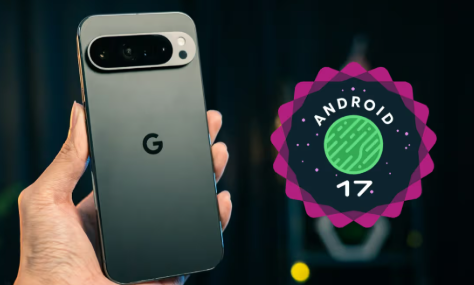
Google has also introduced several new developer and system capabilities in Android 17, including improvements to large-screen experiences, security, media, camera functionality, and system UI.
Note: Android 17 availability can vary depending on your phone manufacturer, model, region, and update schedule. Some features may also require a compatible device or app.
Android updates don’t always feel exciting at first. Sometimes you install a new version, notice a few design changes, and wonder what actually changed. Android 17 is a little different. Google has added several useful improvements that focus on privacy, security, multitasking, cameras, performance, and the overall smartphone experience.
Android 17 is Google’s latest major Android release, officially released on June 16, 2026, with the update beginning to roll out to supported Pixel devices. Google says Android 17 focuses on productivity, security, privacy, media, camera capabilities, performance, battery, and better experiences across different types of devices.
The interesting thing about this update is that it isn’t simply about giving Android a new look. A lot of the changes are happening underneath the surface.
Some improvements will be immediately useful, such as better multitasking and new privacy controls. Others are aimed more at developers, but they can eventually improve the apps and services you use every day.
If you have been searching for the Android 17 new features, this guide covers the changes that are actually worth knowing about in 2026.
Table of Contents
Android 17 New Features You Should Know
Google has introduced a wide range of changes in Android 17. Instead of listing every technical API change, let’s focus on the upgrades that matter most to regular smartphone users.
1. Better Multitasking
Multitasking continues to be a major focus in Android 17.
Android phones are no longer limited to small traditional displays. Foldables, tablets, and larger-screen devices are becoming increasingly common, so Android needs to make better use of the available screen.
Android 17 continues Google’s adaptive approach, with improvements designed to make apps work better across different screen sizes and form factors. Google is also pushing developers toward an adaptive-first approach rather than designing apps for only one type of device.
For users, that can mean a smoother experience when:
- Running multiple apps
- Switching between apps
- Using a tablet
- Using a foldable phone
- Working with an external display
- Resizing app windows
This is particularly useful if you use your smartphone as a productivity device rather than just for social media and calls.
2. More Control Over App Privacy
Privacy is one of the strongest areas of Android 17.
Google has introduced several changes that give apps less unrestricted access to sensitive information.
One important example is the new Android contacts picker. Instead of an app needing broad access to your entire contacts list, Android 17 provides a system-level picker that can let users share specific contact information without granting full contacts permission.
That’s a much better approach for privacy.
Think about a shopping, messaging, or social app that only needs one contact. You shouldn’t necessarily have to give that app access to your entire address book.
Android 17 moves closer to giving users that kind of control.
3. Stronger OTP Protection
One of the most practical privacy changes involves one-time passwords.
OTPs are used constantly for:
- Banking
- UPI payments
- Shopping
- Email accounts
- Social media
- Two-factor authentication
Android 17 introduces stronger restrictions for apps accessing OTPs from standard SMS messages. Non-priority apps don’t get immediate access to these one-time passwords, even when the user has granted SMS permission.
This is important because an app having SMS access doesn’t automatically mean it should be able to grab every security code that arrives on your phone.
For users, this is one of those changes that works quietly in the background but can make the phone safer.
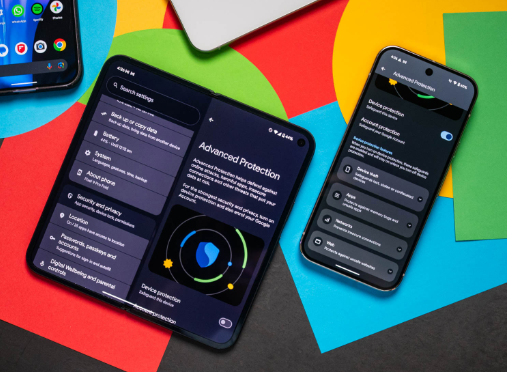
4. Android Advanced Protection Mode
Android 17 also introduces Android Advanced Protection Mode, aimed at people who want stronger security protections.
Google describes it as an opt-in security mode that applies a more opinionated set of protections. These include blocking app installations from unknown sources, restricting USB data signaling, and requiring Google Play Protect scanning.
This isn’t necessarily something every user needs to turn on.
But if you handle sensitive information, work with important accounts, or are particularly concerned about targeted attacks, having a stronger security mode available is useful.
It also gives Android a clearer answer to users who want more protection than the standard settings provide.
5. Better Protection for Messages
Android 17 changes how apps can access certain messages.
According to Google’s Android 17 documentation, most apps can no longer access end-to-end encrypted messages through the same mechanisms available previously.
Combined with the new OTP restrictions, this shows a clear direction for Android: sensitive communications should not be freely available to every app that asks for access.
For everyday users, the benefit is simple — fewer apps getting unnecessary access to private information.
6. New Contacts Picker
The new contacts picker deserves its own mention because it makes permissions easier to understand.
Previously, many apps could request permission to read your contacts. Once granted, that permission could provide broad access.
Android 17 introduces a system contact picker that allows users to select contacts without necessarily giving the app full access to the contacts database.
It’s similar to the privacy-focused approach Android already uses for other types of personal information.
Instead of asking:
“Can this app access everything?”
Android can increasingly ask the following:
“What exactly do you want to share?”
That’s a much more user-friendly privacy model.
7. Better Camera and Creator Features
If you enjoy photography, video creation or social media content, Android 17 has some interesting improvements.
Google has introduced new creator-focused capabilities, including improvements for content creation and sharing. Google has also highlighted an optimized Instagram experience and additional creator tools.
At the platform level, Android 17 adds camera and media capabilities for developers.
One notable example is support for RAW14, allowing compatible professional camera applications to capture 14-bit RAW images from supported sensors.
Of course, this doesn’t mean every Android 17 phone suddenly becomes a professional camera.
Your phone still needs compatible camera hardware.
But for high-end smartphones, these platform improvements can give camera developers more flexibility.
8. Improved Screen Recording for Creators
Android 17 also brings more interesting options for people who record content directly from their phones.
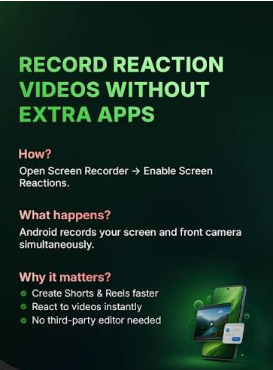
Google has highlighted screen reactions, which allow selfie video reactions to be incorporated into screen recordings on supported Pixel devices. This can be useful for reaction videos, tutorials, and walkthroughs.
For example, imagine explaining how to use an Android setting while your face appears alongside the screen recording.
Previously, that type of workflow often required multiple apps or editing steps.
Now the process can be much simpler on supported devices.
9. Better App Memory Management
This is a technical change, but it can have an effect on everyday performance.
Android 17 introduces app memory limits based on the total RAM available on the device. Google says the goal is to establish more predictable limits and target extreme memory usage before it contributes to system instability, UI stuttering, higher battery drain, or apps being killed.
For normal users, you probably won’t see a setting called “Android 17 Memory Limit.”
Instead, the goal is for the operating system to remain more stable when apps behave badly or consume excessive resources.
This could be particularly useful on devices running many apps at the same time.
10. Stricter Background Audio Controls
Android 17 also introduces changes to background audio behavior.
Apps can no longer freely use certain audio APIs while running invisibly in the background. Google has added stronger restrictions around background audio playback, audio focus, and related volume controls.
Why does this matter?
Because an app shouldn’t unexpectedly start playing audio or interfere with other audio experiences while you’re doing something else.
This should help make background behavior more predictable.
11. Better Bluetooth Reliability
Android 17 also includes an interesting Bluetooth improvement.
Google says Android 17 can automatically re-establish Bluetooth bonds in the background after certain bond losses, reducing the need for users to manually unpair and pair their devices again.
This could be useful for devices such as
- Wireless earbuds
- Smartwatches
- Car systems
- Bluetooth keyboards
- Speakers
- Controllers
Anyone who has had to repeatedly pair a Bluetooth accessory knows how annoying that process can be.
12. WebGPU Comes to Android
For gamers and developers, Android 17 also brings WebGPU support.
Google says WebGPU provides modern graphics and compute APIs using Kotlin and Java and is part of Android’s transition toward Vulkan as its primary low-level GPU API.
This isn’t something most users will immediately notice in the Settings app.
However, it could become important for future games, browser-based experiences, and applications that need more advanced graphics performance.
In other words, this is more of a foundation for what’s coming next.
13. Better Support for Foldables and Tablets
Android 17 continues Google’s move toward supporting more than traditional phones.
Android developers are now expected to build applications that adapt to phones, tablets, foldables, ChromeOS devices, automotive displays, and other environments.
For consumers, this could gradually lead to apps that feel more natural when moving between different devices.
If you own a foldable phone or Android tablet, these changes are especially relevant.
14. Better Support for Local Network Privacy
Android 17 also introduces stricter requirements for apps that want to access devices on your local network.
Apps targeting Android 17 need appropriate permission to access local devices.
This matters because your home network may contain:
- Smart TVs
- Printers
- Cameras
- Speakers
- Smart home devices
- Computers
An app shouldn’t automatically be able to interact with nearby devices simply because your phone and those devices are connected to the same Wi-Fi network.
15. Dedicated Assistant Volume Controls
Android 17 also introduces a dedicated Assistant audio stream.
This separates Assistant audio from normal media volume, allowing users to control the two independently in supported scenarios.
For example, you could potentially keep music at one volume while controlling Assistant responses separately.
It’s a small change, but it makes Android’s audio controls more flexible.
Android 17 vs Android 16
| Feature | Android 16 | Android 17 |
|---|---|---|
| Privacy controls | Strong | More granular |
| OTP protection | Improved | Stronger restrictions |
| Contacts sharing | Permission-based | New privacy-focused picker |
| Large-screen support | Improved | Further adaptive changes |
| Camera APIs | Advanced | More creator-focused capabilities |
| Security | Strong | Advanced Protection Mode + PQC signing |
| App memory | Existing management | New memory limits |
| Bluetooth | Standard experience | Automatic bond recovery improvements |
| WebGPU | Limited/transitioning | Added Android platform support |
| Background audio | Standard controls | Stronger restrictions |
The important point is that Android 17 isn’t simply a cosmetic update.
A lot of its improvements focus on privacy, security, adaptability, and system stability.
If you’re facing issues after installing the new Android version, check our guide on Android 17 update problems for common issues and practical fixes.
Which Phones Will Get Android 17?
Want to compare the new Android version with its predecessor? Read our Android 17 vs Android 16 comparison.
Android updates don’t arrive on every phone at the same time.
Google has started rolling Android 17 out to supported Pixel devices, while other manufacturers have their own schedules. Google says new devices running Android 17 will arrive in the following months.
If you’re wondering whether your smartphone will receive the update, check our Android 17 eligible phones guide for the latest supported and expected devices.
Samsung, OnePlus, Xiaomi, Motorola, OPPO, vivo, iQOO, and other brands may have different timelines.
Even two phones from the same manufacturer may receive the update at different times.
Your best option is to check your manufacturer’s official update policy and then check your phone manually.
How to Check for Android 17 Update
On many Android phones, you can check for the update by going to the following:
Settings → System → Software Update
Depending on your phone brand, the option may instead be called
- Software Update
- System Update
- System & Updates
- About Phone → Software Update
If Android 17 is available for your device, you’ll normally see an option to download and install it.
You can also check our guide on the Android 17 QPR2 update to see the latest beta changes.
Before installing a major update, it’s a good idea to:
- Back up important data
- Charge your phone
- Connect to Wi-Fi
- Make sure you have enough storage
- Avoid interrupting the installation
Pros and Cons of Android 17
Pros
- Stronger privacy controls
- Better OTP protection
- New contacts picker
- Advanced security options
- Better multitasking and large-screen support
- Improved creator and camera capabilities
- Better Bluetooth reliability
- Improved app memory management
- WebGPU support
- More control over background audio
Cons
- Not every phone will receive the update immediately
- Some features depend on hardware
- Some features are mainly useful to developers
- Manufacturer software can change the experience
- Certain new capabilities may be limited to supported devices
Frequently Asked Questions
1. What are the biggest Android 17 new features?
The biggest Android 17 new features include stronger privacy controls, better OTP protection, Android Advanced Protection Mode, a new contacts picker, improved camera and creator capabilities, better multitasking, app memory limits, improved Bluetooth behavior, and WebGPU support.
2. Is Android 17 available now?
Yes. Google officially released Android 17 on June 16, 2026, and began rolling it out to supported Pixel devices. Other Android manufacturers have their own update schedules.
3. Will my phone get Android 17?
It depends on your phone model and manufacturer. Google has started the rollout for supported Pixel devices, while brands such as Samsung, OnePlus, Xiaomi, Motorola, OPPO, vivo, and iQOO decide their own rollout schedules.
4. Is Android 17 better than Android 16?
Android 17 builds on Android 16 with additional improvements to privacy, security, large-screen support, camera capabilities, memory management, connectivity, and system behavior. The difference you’ll notice depends on your phone and how you use it.
5. Should I update my phone to Android 17?
If Android 17 is officially available for your phone, updating is generally a good idea because major Android updates can bring new features, security improvements, and compatibility changes. Before updating, back up important data and make sure your phone has enough battery and storage.
Final Verdict
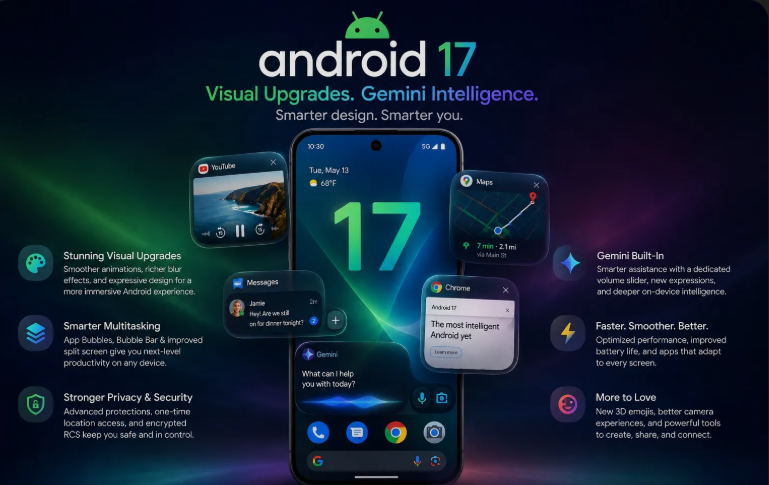
Android 17 is more than another yearly Android update. Google has focused heavily on making the platform safer, more private, more adaptable, and better prepared for modern devices.
The most useful changes for everyday users include stronger OTP protection, the new contacts picker, improved multitasking, better Bluetooth behavior, and additional security controls. Creators and power users also get more interesting camera, media, and screen-recording capabilities, while developers gain new tools that could shape future Android apps.
Not every feature will be available on every phone, and the actual experience will depend on your manufacturer and hardware. Still, if you’re interested in the Android 17 new features, this is an update worth paying attention to throughout 2026.
For most users, the biggest win isn’t a flashy redesign. It’s the gradual improvement in how Android handles privacy, security, multitasking, and everyday reliability.
After going through the major Android 17 new features, it’s clear that Google is focusing less on flashy changes and more on making Android safer, smarter, and easier to use. The improvements to privacy, security, multitasking, Bluetooth, camera tools, and overall performance can make a noticeable difference in everyday use.
Some changes, such as stronger OTP protection and the new contacts picker, work quietly in the background. Others, including improved screen recording, camera capabilities, WebGPU support, and better large-screen experiences, will be more noticeable for creators, gamers, and power users.
Of course, the experience won’t be exactly the same on every phone. Your device’s hardware, manufacturer, region, and update schedule will determine which features you actually receive.
Overall, Android 17 feels like a meaningful step forward rather than just another yearly update. If your phone supports it, the Android 17 new features make upgrading worth considering, especially if you care about privacy, security, performance, and getting more from your smartphone in 2026.
For anyone planning to keep their Android phone for the next few years, the Android 17 new features are another good reason to keep the software updated. The combination of better security, privacy controls, performance improvements, and new everyday tools makes the update more useful than it may seem at first.If you’re curious about what has actually changed this year, the Android 17 new features are worth exploring before deciding whether the update is useful for you. From everyday privacy improvements to better performance and smarter device support, there are several changes that go beyond a simple software refresh.